.svg)
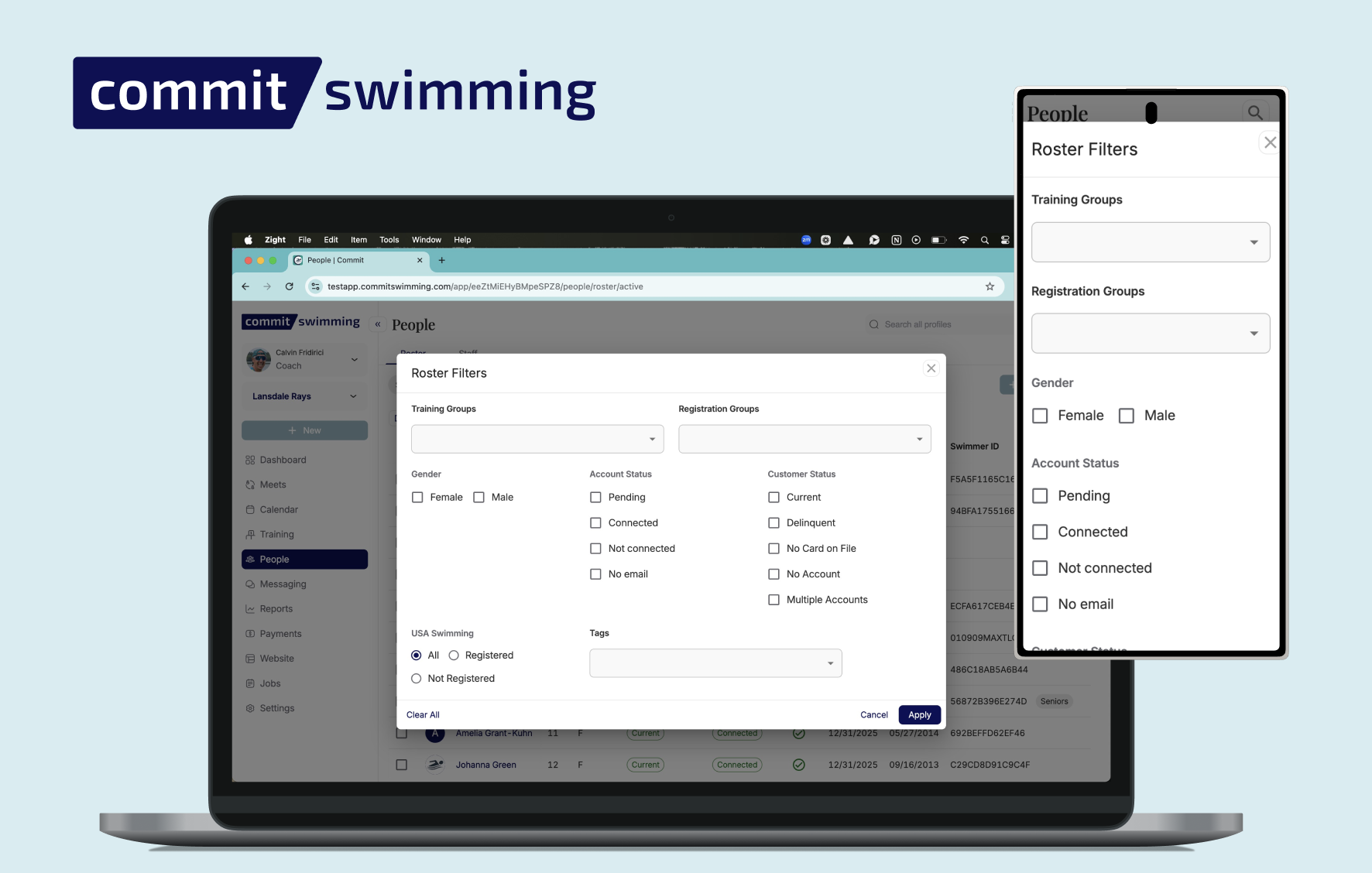
Roster Improvements

Calvin Fridirici


Take Control of Your Team with Commit’s Enhanced Roster
Managing your swim team just got a whole lot easier. Commit’s roster isn’t just a list of names—it’s a powerful tool designed to save you time, reduce stress, and give you full control over your team data. Here’s what makes it stand out:
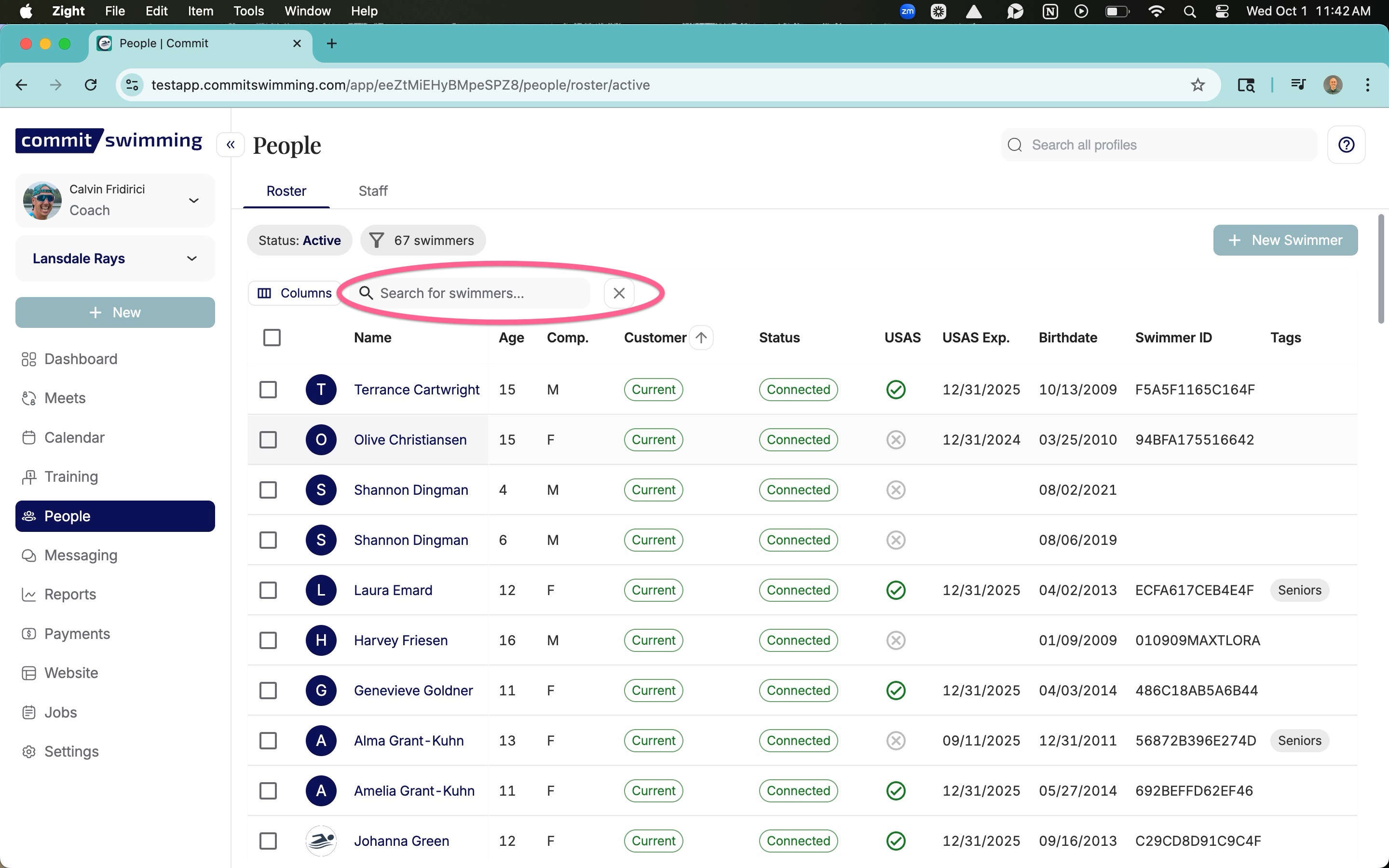
1. Search That Actually Works
Finding a swimmer shouldn’t feel like a treasure hunt. Commit’s roster search is fast, intuitive, and powerful, helping you locate any athlete or piece of information in seconds. No more endless scrolling or guessing where someone’s profile is.
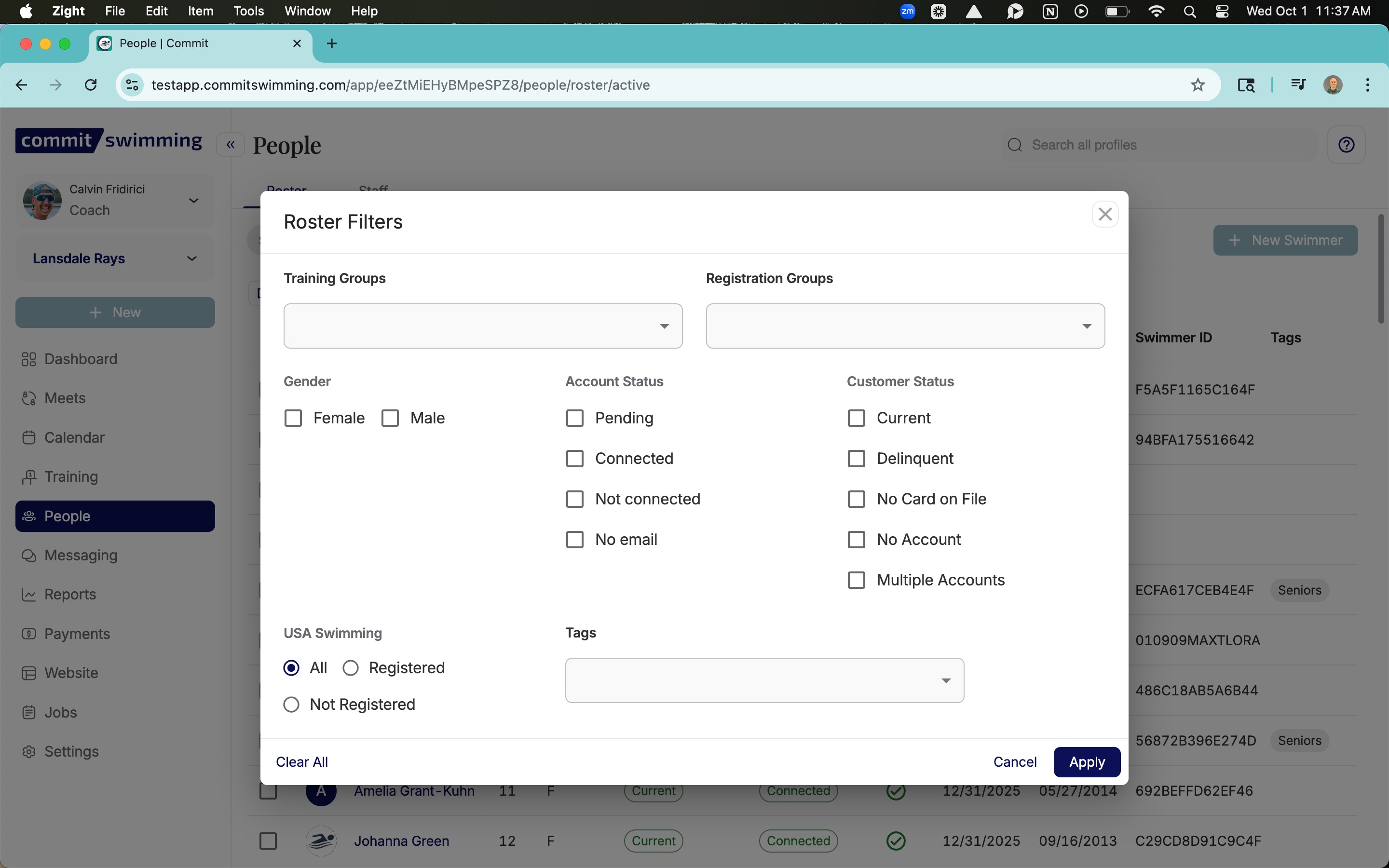
2. Centralized Filters in One Spot
Whether you need to view athletes by age group, skill level, Account Status, Customer Status, or group all your filters live in one convenient place. No hopping between screens or menus—just set your criteria once and see exactly what you need.
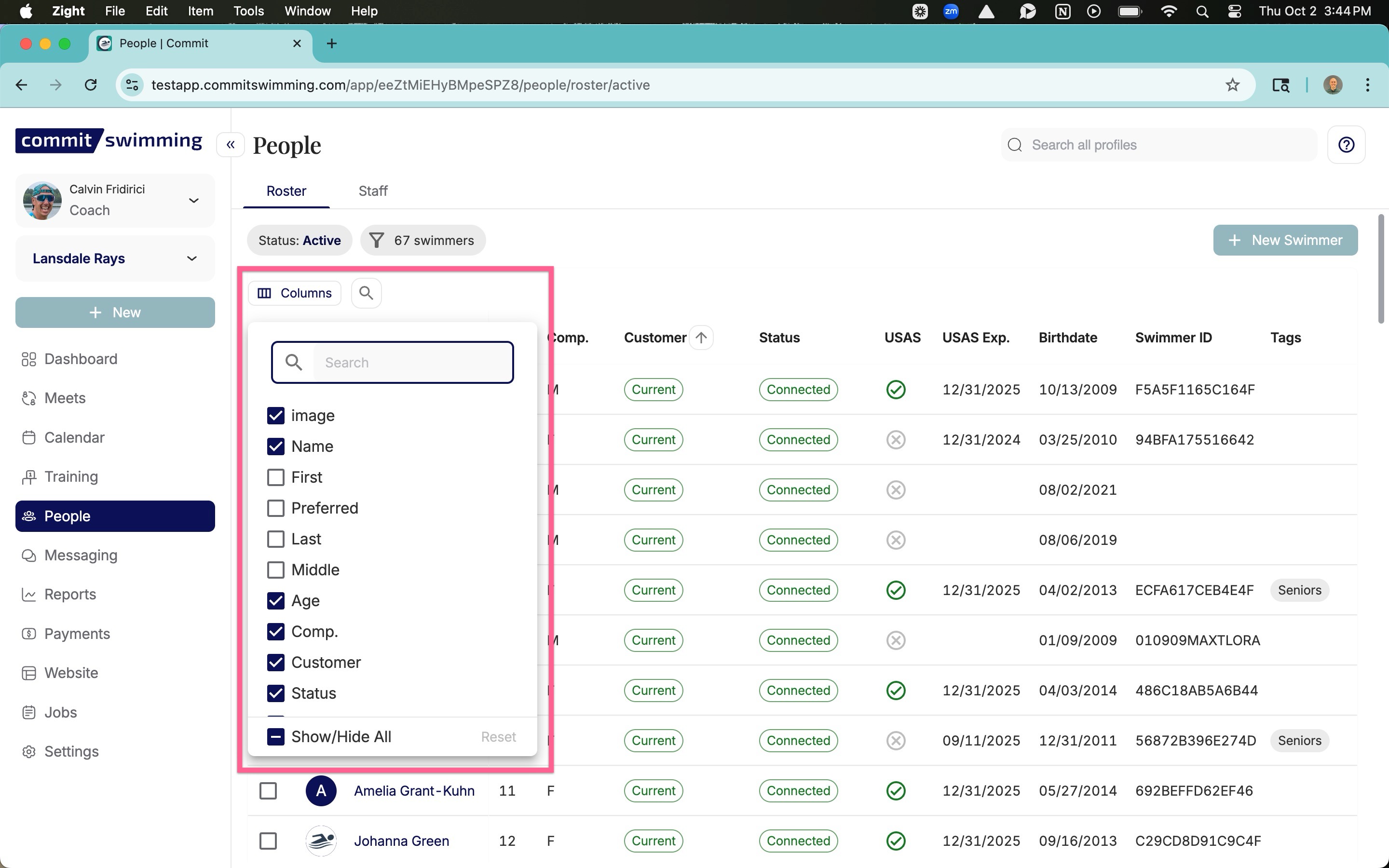
3. Saves Your Last View
Commit remembers how you like to work. Filters, columns, and sorting preferences are saved automatically, so you can pick up right where you left off. Your roster looks the way you want it, every time you log in.
With Commit’s roster, managing your team becomes faster, smarter, and more organized. Spend less time hunting for data and more time coaching.
Filter By Columns
Centralized Filters in One Spot
Search By Any Customer Name Within An Account
Share this post
Calvin Fridirici
Related posts

Navigation & UX
Take Control of Your Meet Results with Commit Swimming
Managing meet results and athlete entries just got a major upgrade in Commit Swimming. We’re excited to announce new features that give you more control and a more streamlined process for handling meet data. These enhancements are designed to put you in the driver’s seat, with more power to manage your team’s meet information accurately and efficiently.

February 5, 2026
0
min read
What’s New with Meet Results
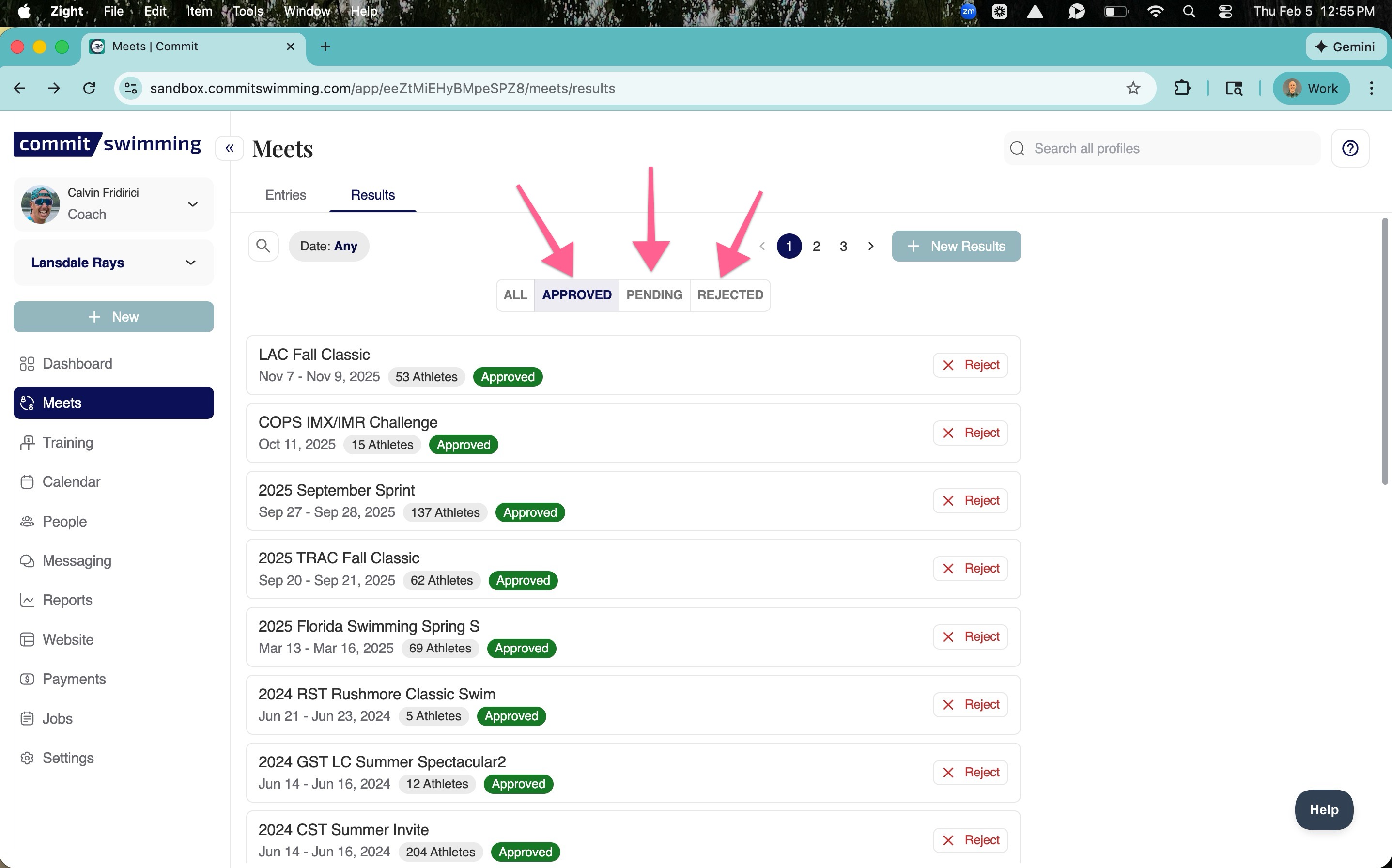
1.Approve and Reject with Ease
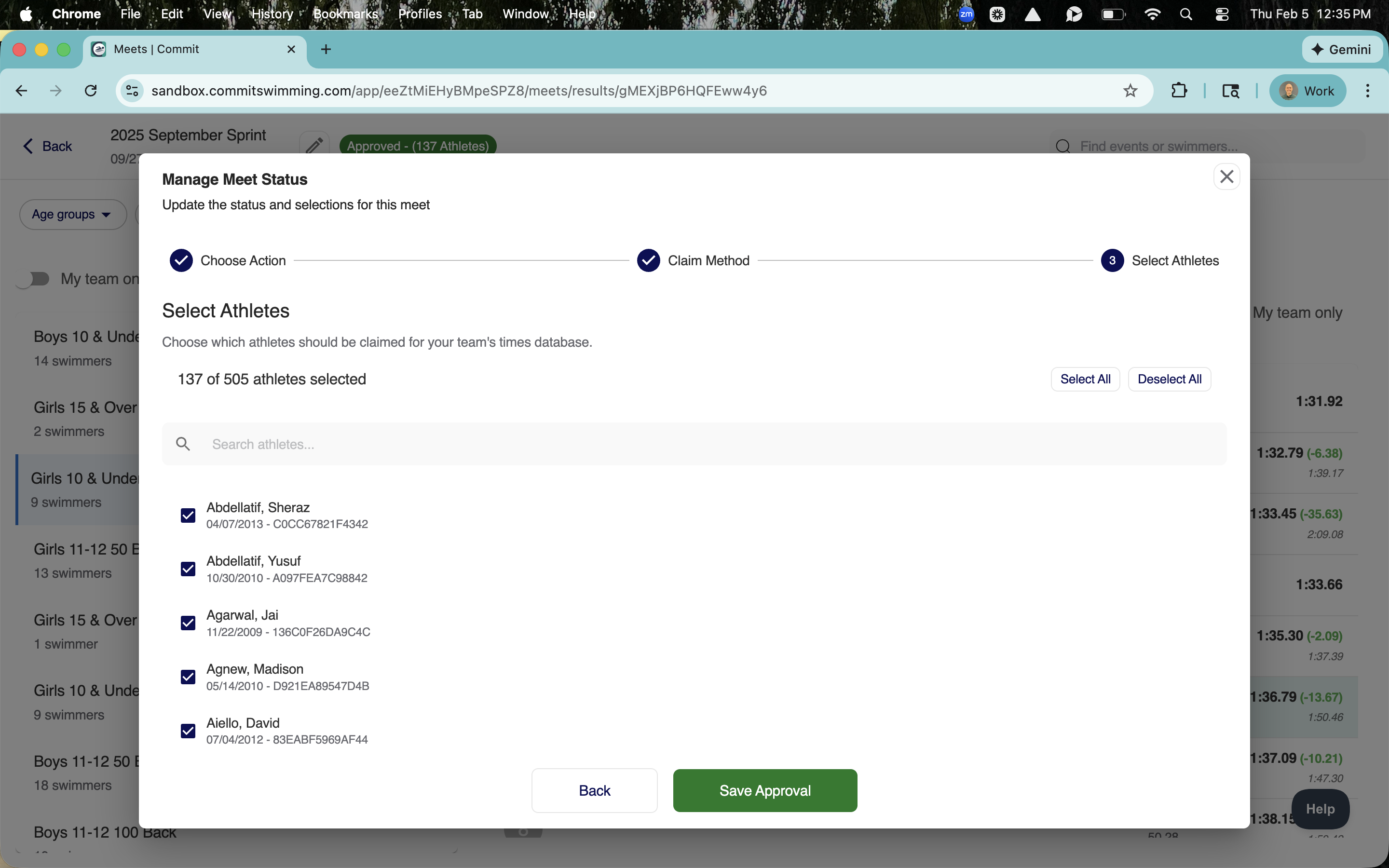
When a new meet result is uploaded, it now appears in a pending tab. From there, you have the power to approve it or reject it, giving you full control over what data is visible for your team.
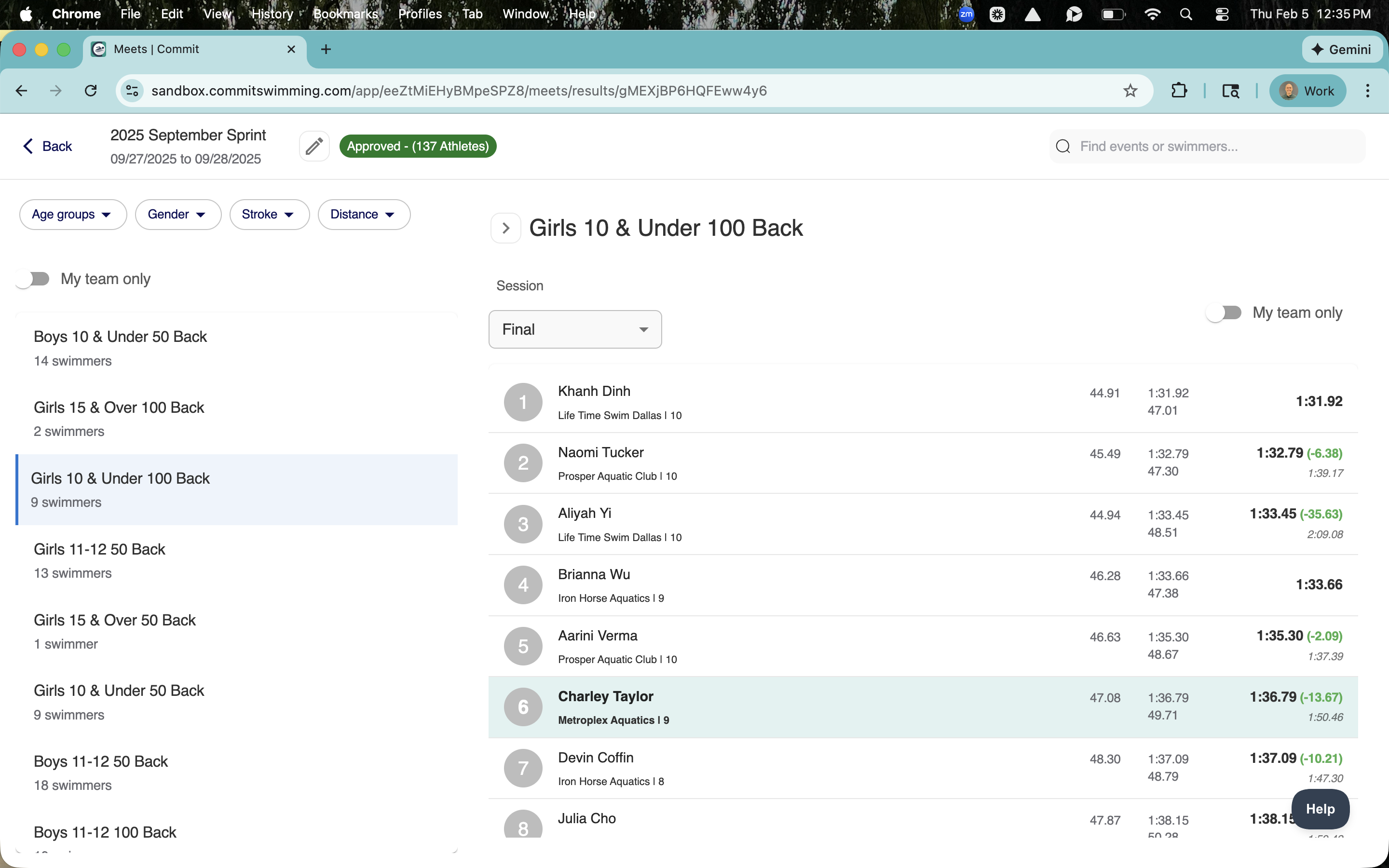
2.Enhanced In-Meet Navigation
We’ve improved the user-friendliness of the meet interface. Now, you can easily click through events within a meet and see all of your team’s swimmers and their times at a glance.
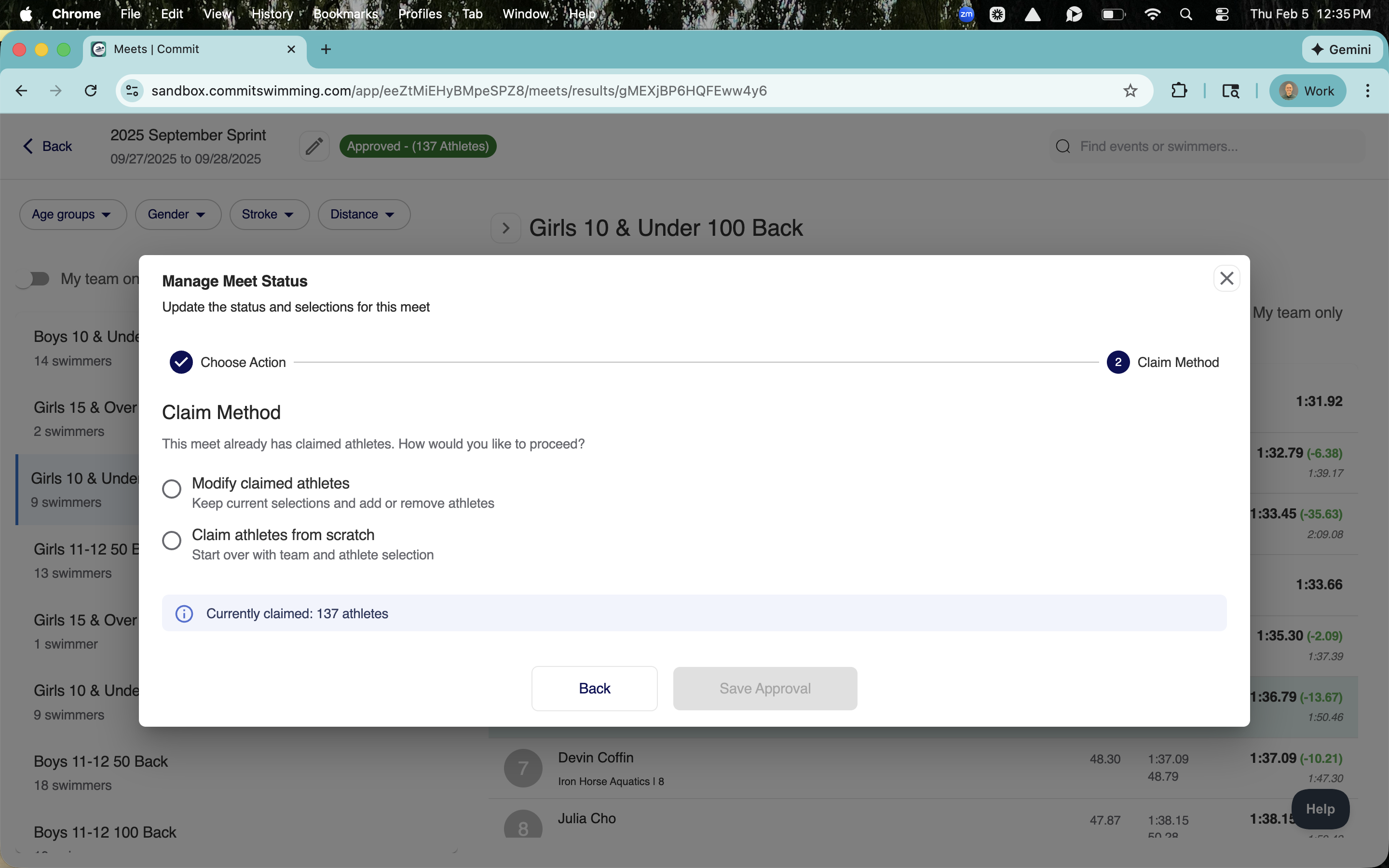
3.Flexible Athlete Approval
You can now edit the approval process for your swimmers. This allows you to modify any claimed athletes within a meet, ensuring your entries are always accurate.
4.Powerful Athlete Selection Tools
We’ve added new tools that allow you to select, deselect, and search for athletes. You can also toggle and claim athletes for a meet, giving you precise control over your team’s entries.

Navigation & UX
Commit Swimming Introduces Automatic Record Boards
Say Goodbye to Manual Updates and Hello to Real-Time Records Keeping your team's record board up-to-date is now easier than ever. Commit Swimming is excited to roll out our new automated Record Board feature, designed to save you time and keep your team's accomplishments front and center. No more spending hours manually updating spreadsheets or website tables. With the new Record Board, your team's top times are automatically updated, so you can focus on coaching, not data entry.
Calvin Fridirici
February 5, 2026
0
min read
What’s New with the Record Board
1.Automatic Updates
When you upload a meet, any new top times will automatically sync to your record board. It's that simple. Your records stay current without any extra work.

2.Full Control and Customization
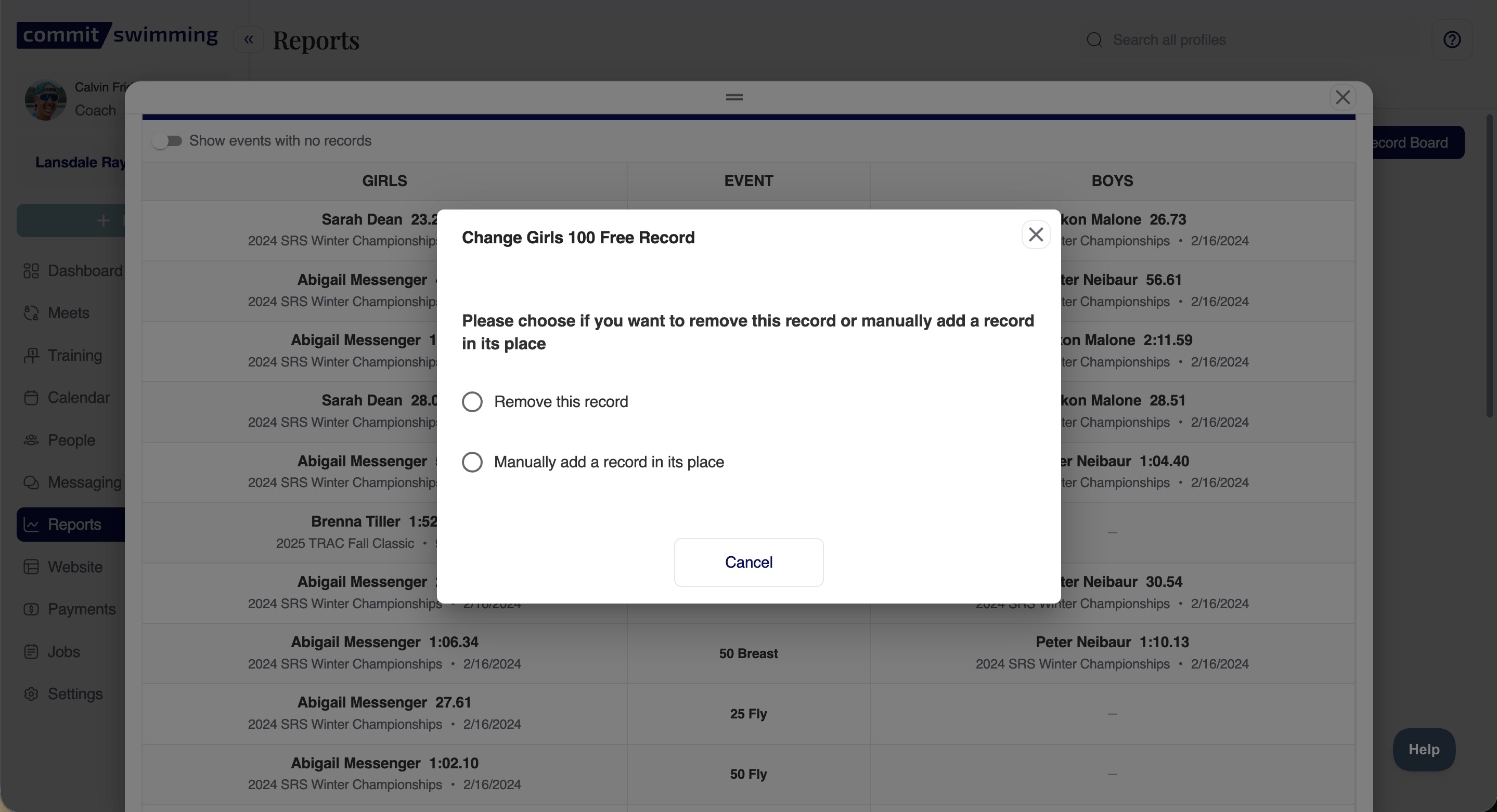
Need to make a change? No problem. You can manually edit, add, or remove times as needed. You also have the flexibility to create custom record boards with fields that you define, tailoring them to your team's specific needs.
3.Export and Share with Ease
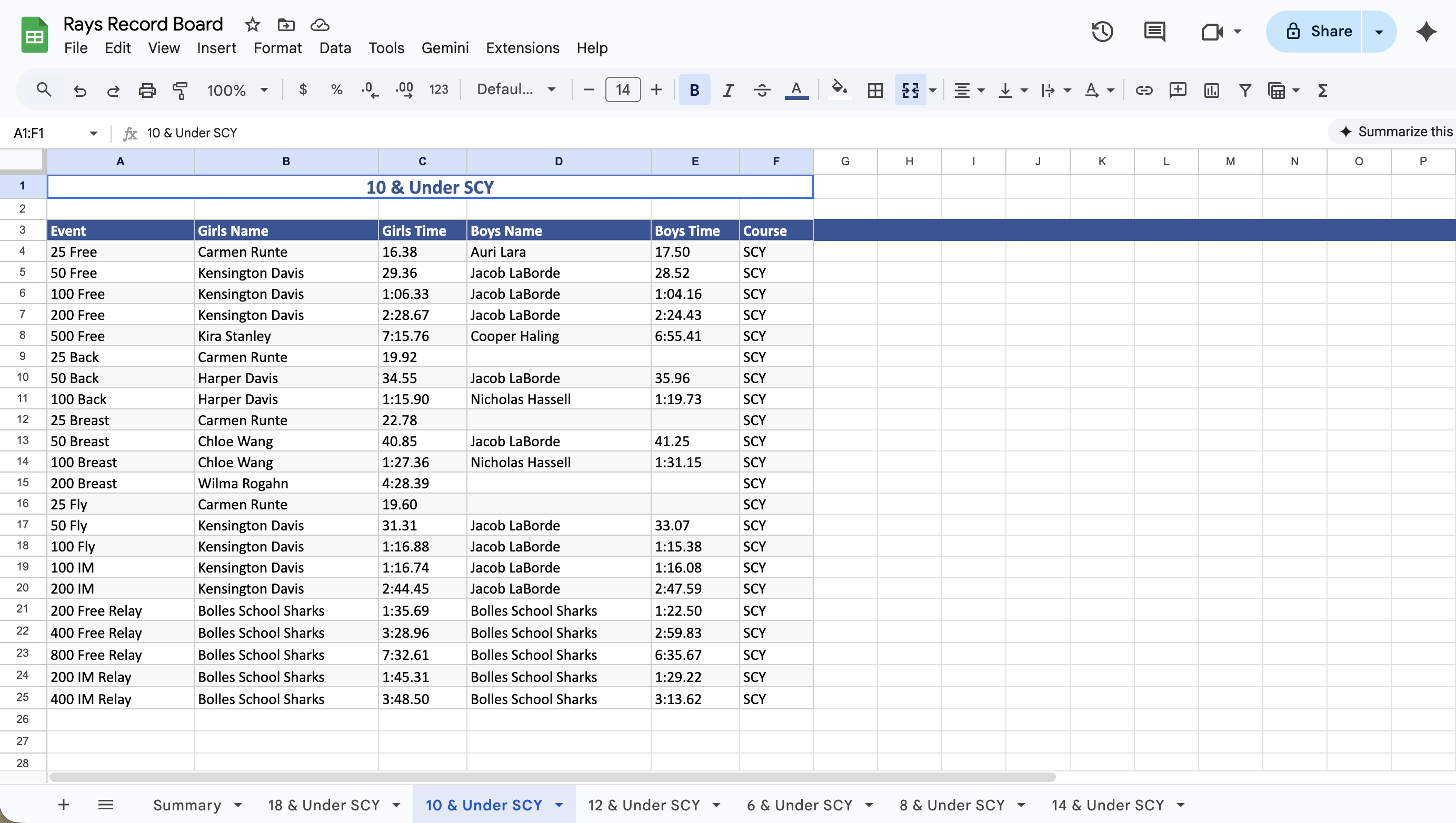
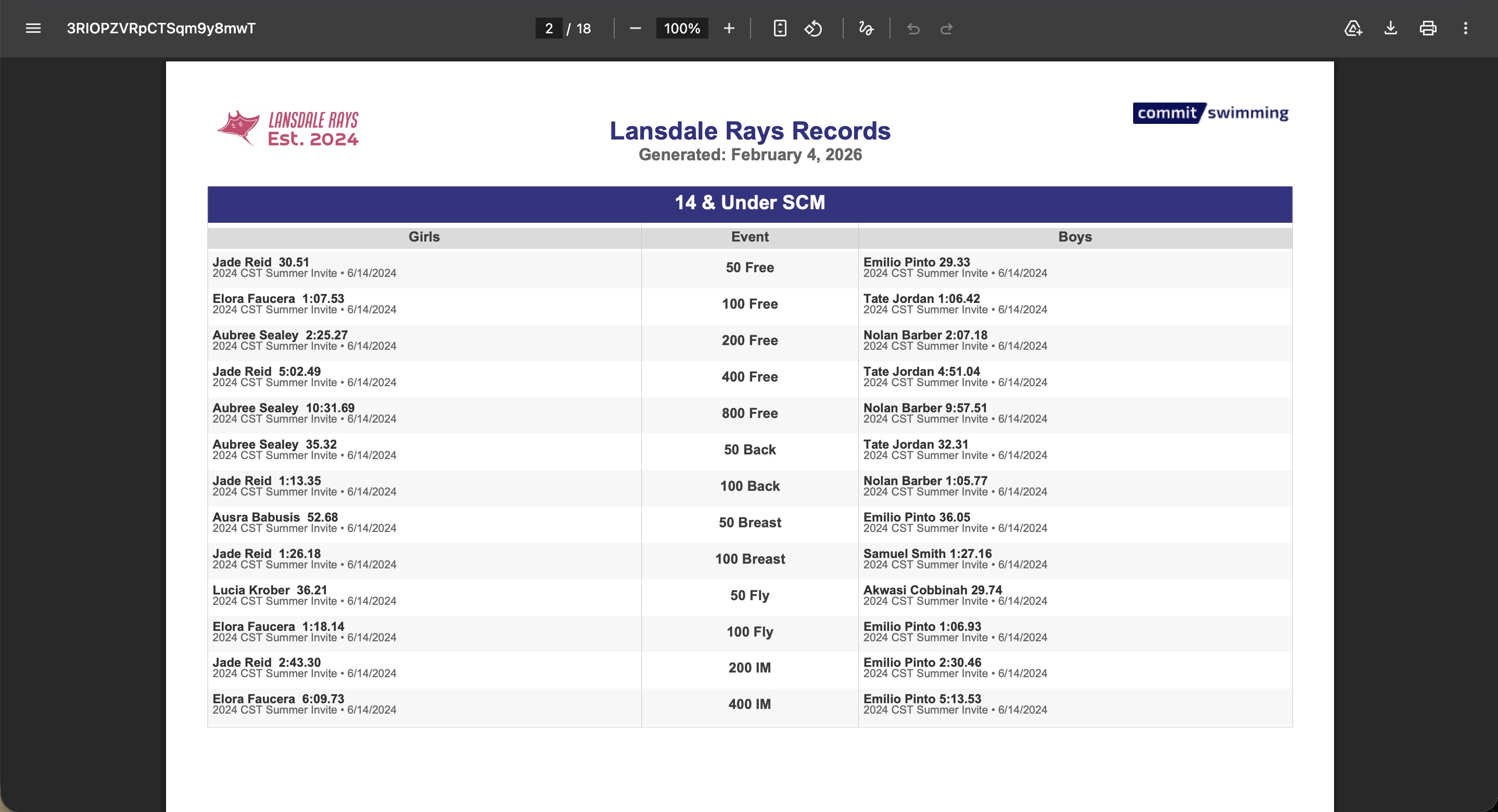
You can export your record boards to either PDF or Excel. The PDF format is perfect for printing and displaying on your pool deck bulletin board, while the Excel export allows for further data analysis, with each record board on a separate sheet.
4.Seamless Website Integration
The new Record Board feature also syncs directly with your team's website. This means your online record book is always up-to-date, showcasing your swimmers' achievements in real-time.

Reports & analytics
Enhanced Attendance and Training Reports
Commit Swimming continues to evolve with thoughtful updates aimed at making your workflow smoother and more intuitive. The latest improvements focus on Attendance and Training Reports, giving coaches and athletes clearer visuals, smarter filters, and better ways to track progress.
Calvin Fridirici
October 1, 2025
0
min read
Commit Swimming Enhances Attendance and Training Reports for a Smarter Coaching Experience
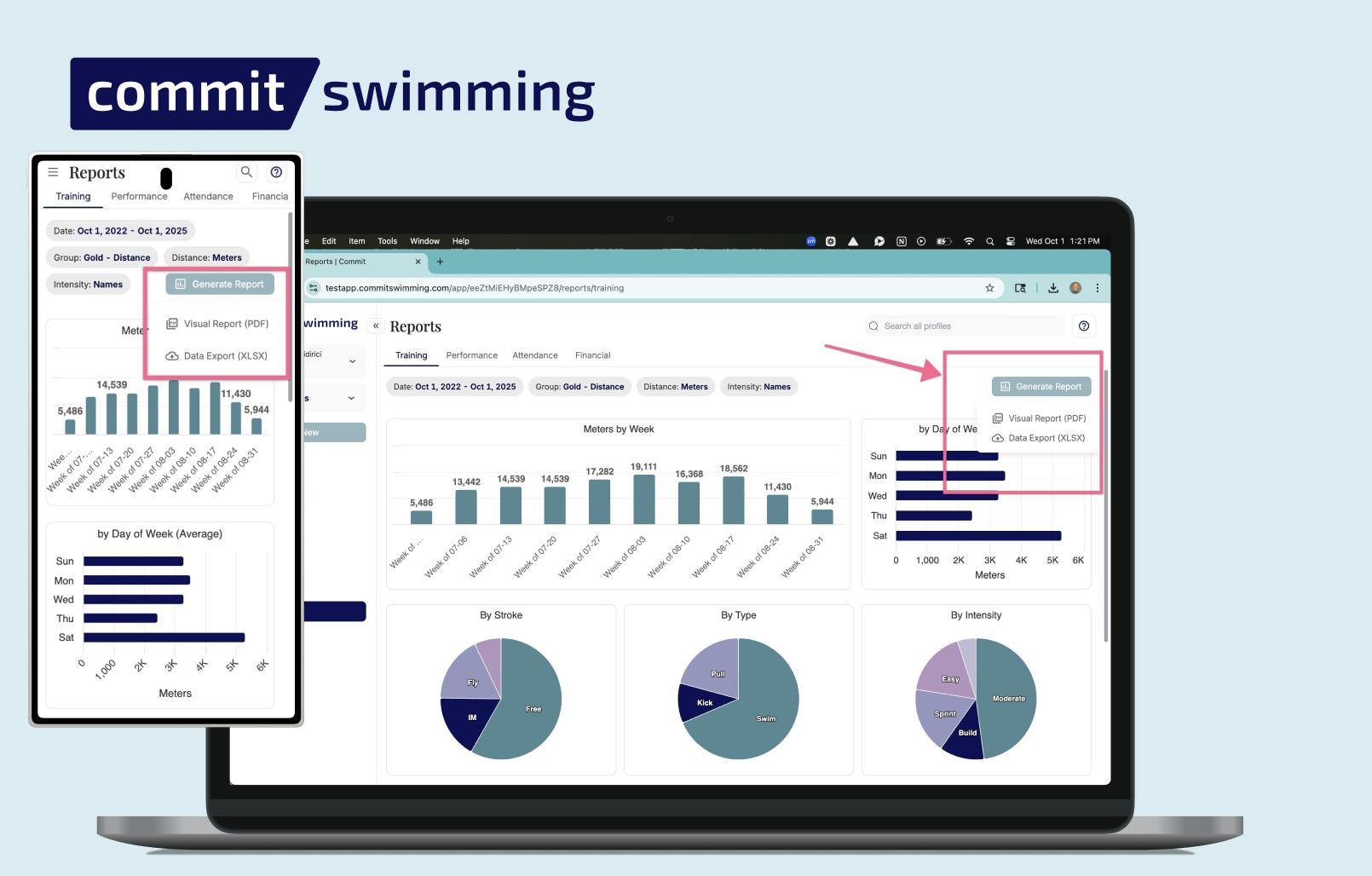
Commit Swimming continues to evolve with thoughtful updates aimed at making your workflow smoother and more intuitive. The latest improvements focus on Attendance and Training Exportable Reports, giving coaches and athletes clearer visuals, smarter filters, and better ways to track progress.
What’s New in Attendance and Training Reports
1. Attendance Export Options: Need a copy of attendance data? You can now export reports directly to spreadsheets or PDFs. Sharing records with staff, parents, or for team meetings is seamless and quick.
2. Training Export Options: Export training data in spreadsheet or PDF format to keep your team informed, monitor progress over time, and maintain organized records.
3. Direct Athlete Export Views: Click directly within an athlete to view attendance and training reports - also updated with similar designs and export functionality.
These updates are designed to:
- Make tracking easier: Clearer visuals and intuitive filters save time and reduce confusion.
- Simplify exporting: Quickly generate spreadsheets or PDFs for coaches, athletes, or parents.
- Provide consistency: Athletes and coaches now share a consistent reporting experience, making communication and progress tracking smoother.
A Smarter Workflow for Coaches and Athletes
Whether you’re managing attendance, monitoring training, or reviewing athlete progress, these report enhancements streamline your workflow and give you the insights you need—faster and more effectively.
Rosters & registration
Registration Caps
Managing registration group sizes is now easier than ever with Commit Swimming’s new registration caps feature. This update gives coaches and administrators more control over enrollment while keeping parents informed throughout the process.
Calvin Fridirici
September 9, 2025
0
min read
What’s New with Registration Caps
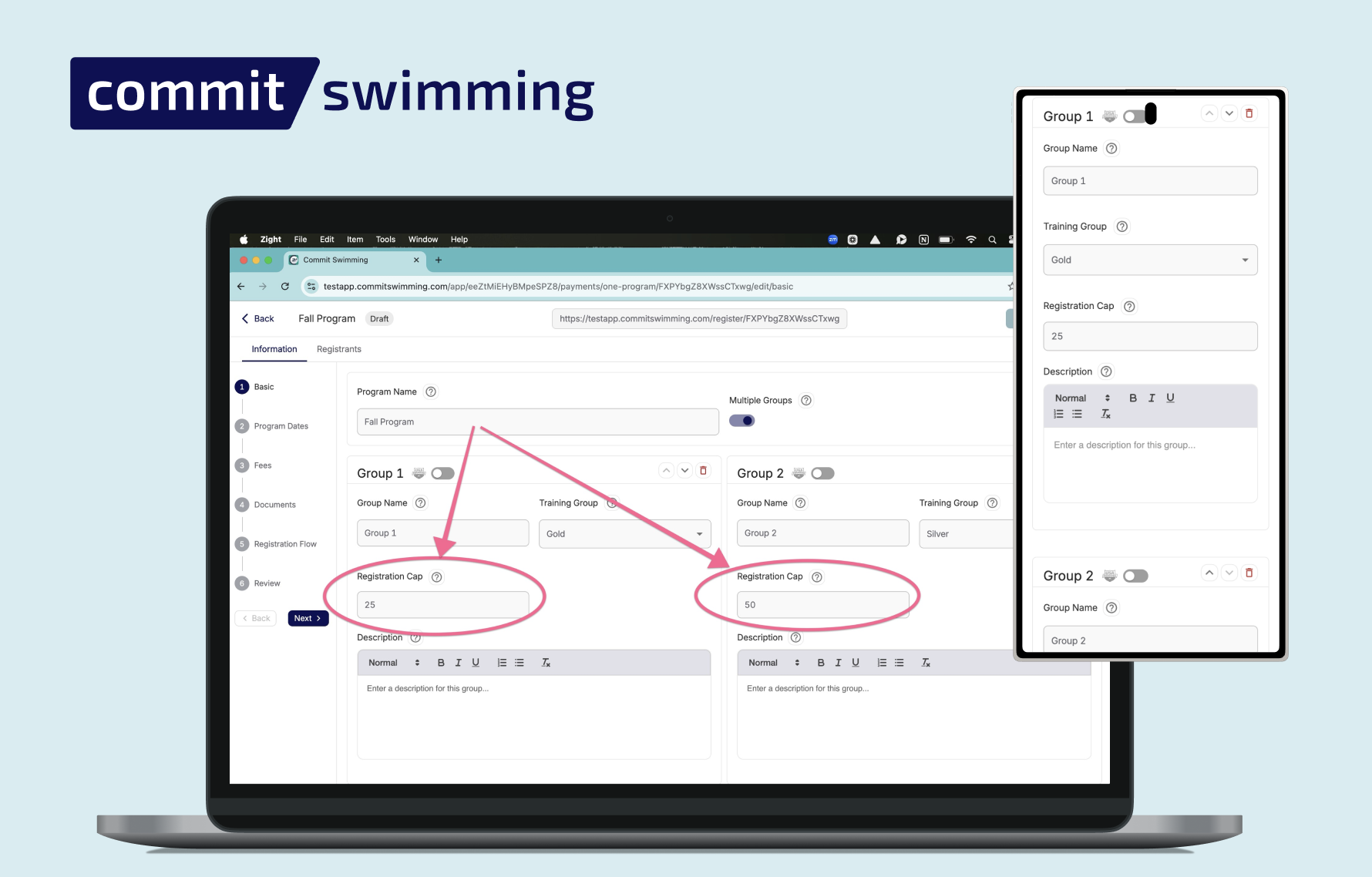
1. Set a Cap per Group
Coaches and admins can now set a registration limit for each live program group. Once the cap is reached, no additional registrations will be allowed—keeping rosters organized and balanced.
2. Parents See When Groups Are Full
Parents can still view capped groups, but they’ll see clearly that registration is closed. This eliminates confusion while maintaining transparency.
3. Real-Time Registration Numbers
Parents can also see how many swimmers are registered relative to the cap. This visibility makes it easy for families to plan and helps build urgency for popular groups.
4. Editable at Any Time
Need to adjust capacity? Coaches and admins can edit group caps at any point, whether that means opening extra spots or tightening limits.
Why It Matters
Group management can be stressful during registration periods, but these new tools simplify the process:
- No more overfilled groups
- Clear communication with parents
- Flexible control for coaches and admins
Streamlined Registration, Happier Teams
With registration caps, Commit Swimming gives teams the power to manage group sizes smoothly while keeping parents in the loop. It’s one more way the platform helps you stay organized, reduce admin stress, and focus on coaching.
Reports & analytics
Enhanced Financial Reporting
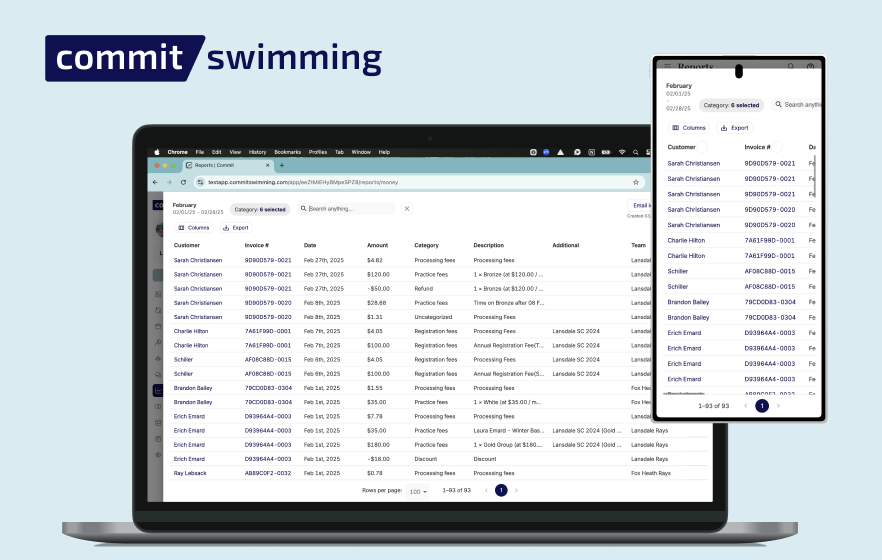
Managing team finances just became simpler and more transparent. Commit Swimming’s new financial reporting tools are designed to give coaches and administrators a clear, actionable view of their program’s financial health—all in one place.
Calvin Fridirici
August 4, 2025
0
min read
Comprehensive Overview at a Glance
Quickly see the big picture with consolidated dashboards that show:
- Total revenue and outstanding balances
- Key trends over time
- Easy-to-read summaries for each training group or customer
Granular Detail When You Need It
Drill down into specific reports to:
- Track payments by athlete, family, or group
- Identify overdue balances instantly
- Export data for further analysis or sharing with your board
Smarter, Faster Navigation
Filters carry over seamlessly as you explore different views, allowing you to:
- Toggle between team-wide summaries and individual accounts without losing your place
- Save your most-used filters for quick access
- Stay organized while managing complex financial data
Why It Matters
Keeping your program financially healthy is critical, but it shouldn’t take hours of admin work. With Commit Swimming’s enhanced financial reporting, you can:
- Save time on monthly reconciliations
- Stay on top of outstanding payments
- Make better decisions with real-time insights

Workouts & training
Faster Workout Filters for Streamlined Planning
Searching and sorting workouts in Commit just got a major upgrade. With our latest improvements to workout filters, finding exactly what you need has never been easier or faster.
Calvin Fridirici
May 21, 2025
0
min read
What’s New with Workout Filters
1. Speed You Can Feel
Filtering workouts is now lightning fast. Apply filters and get instant results without delays or page reloads. It’s a smoother, snappier experience that keeps up with your coaching pace.
2. Smarter Filter Options
New and improved filter categories let you:
- Search by date range
- Find workouts by training group
- Filter by tags, titles, or key terms
- Narrow down to specific types of sets or focuses (e.g., sprint, IM, aerobic, technique)
3. Persistent Filters
Your filters now stay in place as you toggle between views, making it easier to:
- Review a series of workouts without resetting your criteria
- Quickly copy or adapt past sessions
- Compare practices across seasons or athletes

Workouts & training
Manage your training groups easier with enhanced filters
Managing your teams just got a whole lot easier. Our latest update introduces smarter, faster filters that make it quicker than ever to sort, search, and organize your training groups. Whether you're a head coach overseeing multiple squads or an assistant focusing on a specific group, these upgrades help you find what you need—without the extra clicks.
Calvin Fridirici
May 20, 2025
0
min read
What’s New with Training Group Filters?
Lightning-Fast Filtering
We have optimized our filtering engine to respond instantly. Apply filters to training groups in real time with no lag, helping you get to the right group or swimmer without delay. Now you can easily search by group status, by which coaches are connected to training groups and by what team you would like to view!
Why It Matters
Managing training groups is a core part of your coaching workflow. With these enhanced filters, Commit Swimming ensures:
- Faster access to the right information
- Less manual sorting
- More time focused on athlete development

Navigation & UX
Streamlined User Experience with Smarter Navigation and Search Tools
Commit Swimming continues to evolve with thoughtful design updates aimed at making your workflow smoother and more intuitive. The latest round of improvements focuses on general user experience (UX), with enhancements to roster and customer tabs that make searching, filtering, and navigating faster and more seamless.
Calvin Fridirici
April 22, 2025
0
min read
What’s New in the Commit Swimming UX Update
1. Smarter General UX
From the moment you log in, you’ll notice a more responsive, user-friendly interface. Commit Swimming has refined how information is displayed and accessed, making it easier to find what you need without clicking through multiple screens. Everything feels faster, cleaner, and more in tune with how coaches and administrators actually use the platform.
2. Roster Pull-Out Panel
Need to check your roster quickly? Now you can pull it out without leaving the page you're on. This slide-out panel gives you instant access to athlete information, attendance, and group assignments. It’s perfect for mid-task referencing without breaking your workflow.
3. Customer Tab Pull-Out
Just like the roster feature, the new customer tab pull-out lets you view parent or customer info on the fly. Whether you’re confirming billing details or checking contact info, you can now do it in-context without bouncing between tabs.

New in Commit: Universal Add Button
Commit's new universal add button allows coaches and team administrators to take fast actions. Instead of navigating to a specific screen to create a workout, add a new meet file, or write a new team message, simply use the universal add button always visible on your menu.

Dan Dingman
April 16, 2025
0
min read
What is the universal add button?
It's pretty simple - this new button allows you to create "things" from any screen.
Why did we build this feature?
We are always looking for ways to improve the Commit Swimming product. As we've grown in our feature-set, it became clear that users would benefit from a button like this to create a variety of different things within Commit from any screen. It speeds up coach and team admin workflows.

New in Commit: Workout View Redesign
Commit's new workout writing design is simple to use for coaches. The look and feel are more intuitive than before, allowing all of the same functionality + an even better experience for favorite sets, workout notes, and attendance taking.
Dan Dingman
April 16, 2025
0
min read
What is the workout view redesign?
It's pretty simple - our workout writing feature now looks more beautiful :) (in our opinion of course).
Why did we build this feature?
We are redesigning every feature inside Commit 1 by 1. We had a few changes we wanted to make to some workout writing features that we made alongside this redesign. We added the ability to have attachments on workout notes, mark swimmers "excused" on attendance, search for favorite sets, and more!

New in Commit: Workouts Full Text Search
Search through your entire workout history by just typing! Commit's new full-text workout search makes finding what you're looking for super simple.
Dan Dingman
April 16, 2025
0
min read
What is workouts full-text search?
Commit has always had a way for coaches to filter workouts and search them by name. However, now we added full-text search to your workouts history. This means you can search through past workouts you wrote using any words you think are in the workout you're looking for. You also can search for subgroup specific workouts using our "#" search feature.
Why did we build this feature?
As coaches have been using Commit now for a decade, there is more of a need now than ever to allow users to search through their own workout history in a fluid way. This new search feature combined with filtering workouts down by date, group, or coach creator, allows coaches to find what they need quickly.

New in Commit: Attendance Improvements
New in Commit - you can now do more with attendance. Coaches with large groups can search for swimmers, pull up swimmers from other groups who might be attending today's workout, and mark swimmers "excused" from practice directly on the workout itself.
Dan Dingman
April 16, 2025
0
min read
Key Enhancements to Attendance in Commit Swimming
1. Search through swimmers
No need for scrolling through a list of 50+ swimmers to find the one you're looking for. Just start typing their name and filter down the list.
2. View other groups' swimmers
Sometimes schedules change and a swimmer from a different group attends your workout. Instead of having to go into that swimmer's profile to mark them present for this workout, you can do it directly on the workout itself.
3. Mark swimmers "excused"
You can now mark a swimmer "excused" directly from the workout attendance taking screen as well.
Make the switch to Commit today
You work too hard to be stuck with outdated, clunky swim team management software. Switching does take time and effort but we do the heavy lifting for you. Our onboarding team helps you bring over your roster, family contact information, results history, and website content to Commit.